IPv6 on HAMNET with 6to4
Published on: March 29, 2026
Last updated on: May 17, 2026
Although there are some proposals for amateurs to receive a 44net equivalent in IPv6, this hasn’t happened yet. However, it’s not true that we don’t have any IPv6 address space. In fact, we have a whole /24 of IPv6 dedicated to amateur radio. It has been implicitly given to us via the 6to4 transition mechanism, meaning that anyone who has a 44net address, be it from ARDC directly, HAMNET, or any other project, also has a /48 of IPv6.
These are not normal addresses, though. They are meant to support the transition from IPv4 to IPv6 so v6 packets get transferred over a v4 backbone.
         HOST                 ROUTER       44.128.1.1 <--> 44.128.2.1       ROUTER                  HOST
2002:2c80:101::cafe ---> 2002:2c80:101::1 <--------------------------> 2002:2c80:201::1 ---> 2002:2c80:201::baba
This is a great way to introduce IPv6 on HAMNET because two people can start using IPv6 without every hop in the middle needing to be v6 capable. There is also no additional administrative overhead since every IPv4 address nicely translates to a /48 prefix.
6to4 is widely known to be problematic on the Internet, but this doesn’t mean it will be problematic on HAMNET. If there exist both IPv4 and IPv6 backbones (like on the Internet), a 6to4 host (which uses the v4 backbone) wanting to communicate with a native IPv6 host (uses v6 backbone) needs to go through a relay that bridges the two. This creates bottlenecks, routing inefficiencies and additional points of failure, but notice that this mess happens only when two backbones need to get bridged. HAMNET doesn’t have IPv6 backbone at all, so there is nothing to bridge, meaning that all 6to4 connections will be point-to-point, without any relays involved.
This, however, doesn’t mean that all of amateur radio can use 6to4. The technology is pretty much dead on the Internet with few relays left. Therefore, amateur radio still requires a globally unique IPv6 allocation to exist on the Internet, like we do with 44net currently. Getting globally unique address space is not easy, though. It won’t happen if we don’t show that, in fact, we do know how to use IPv6 and are willing to implement it. So instead of just sitting and waiting, let’s use what we already have, a gigantic 6to4 prefix, where it’s actually useful, not on the public Internet, but to kickstart IPv6 adoption in isolated networks such as HAMNET.
What happens when HAMNET gets native IPv6?
Some of you are rightfully worried about what is going to happen when we get a real GUA and decide to route it over BGP. When that happens, relays will have to get deployed in order to bridge 6to4 and native IPv6. This is going to break the point-to-point topology of a pure 6to4 network, so the logical next question is: Will that lead to the exact same inefficiencies 6to4 currently faces on the Internet? The answer is it won’t be nearly as bad. Internet has many transit providers with complicated relationships between each other, this leads to problems with anycast and ultimately to someone from Europe being routed through an Australian relay. HAMNET doesn’t have transit providers, it’s just a mesh that tries to deliver packets over the shortest path (as opposed to choosing a path based on who is paying whom, like it’s often done on the Internet). This means that the anycast of relays is going to be much more efficient.
Simple MikroTik configuration for 6to4 on HAMNET
- Go to
IPv6 > Settingsand make sureDisable IPv6is unchecked andIPv6 Forwardis checked. Now reboot.
For RouterOS 6 you need to install the IPv6 package first.
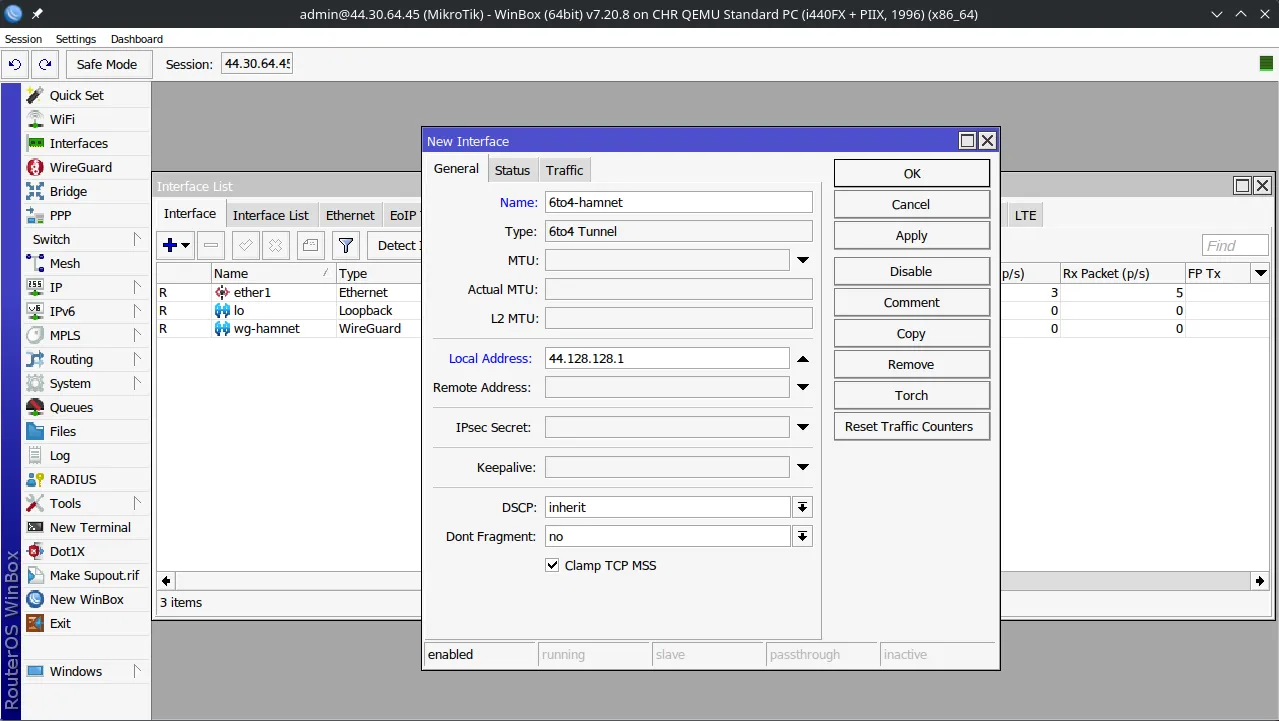
- Add a
6to4 tunnelinterface with theLocal Addressset to the HAMNET address of your router. Leave theRemote addressempty or set to0.0.0.0.
- Paste the same address of your router in the tool below:
| IPv4 address: | |
| 6to4 prefix: |
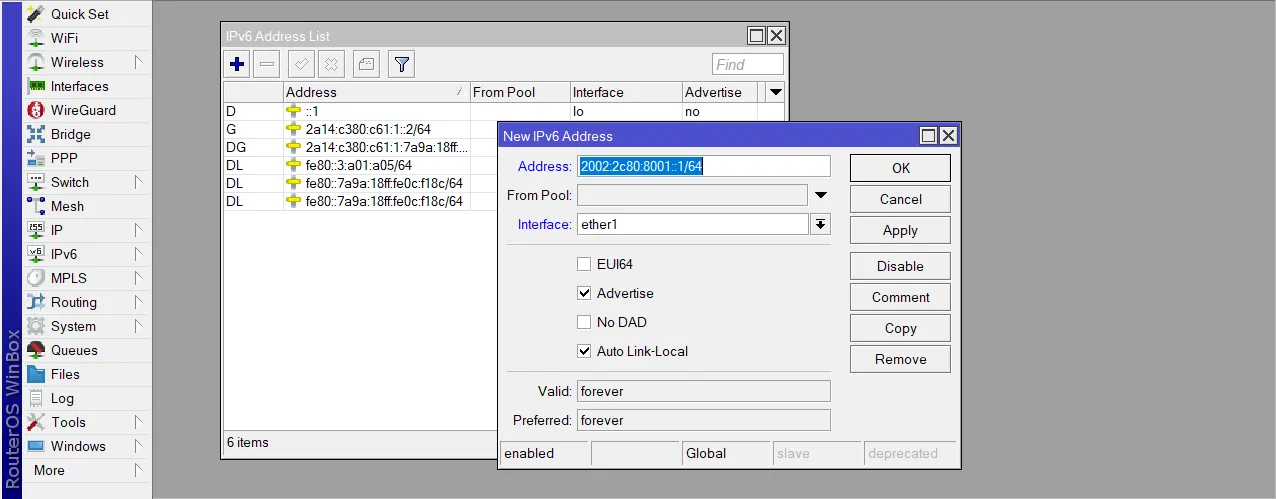
- Give your router an IPv6 address from the prefix calculated above by going to
IPv6 > Addresses. Make sure to select your LAN interface when adding the address, in my case this wasether1. Always use/64prefix size, that’s the standard.
- Go to
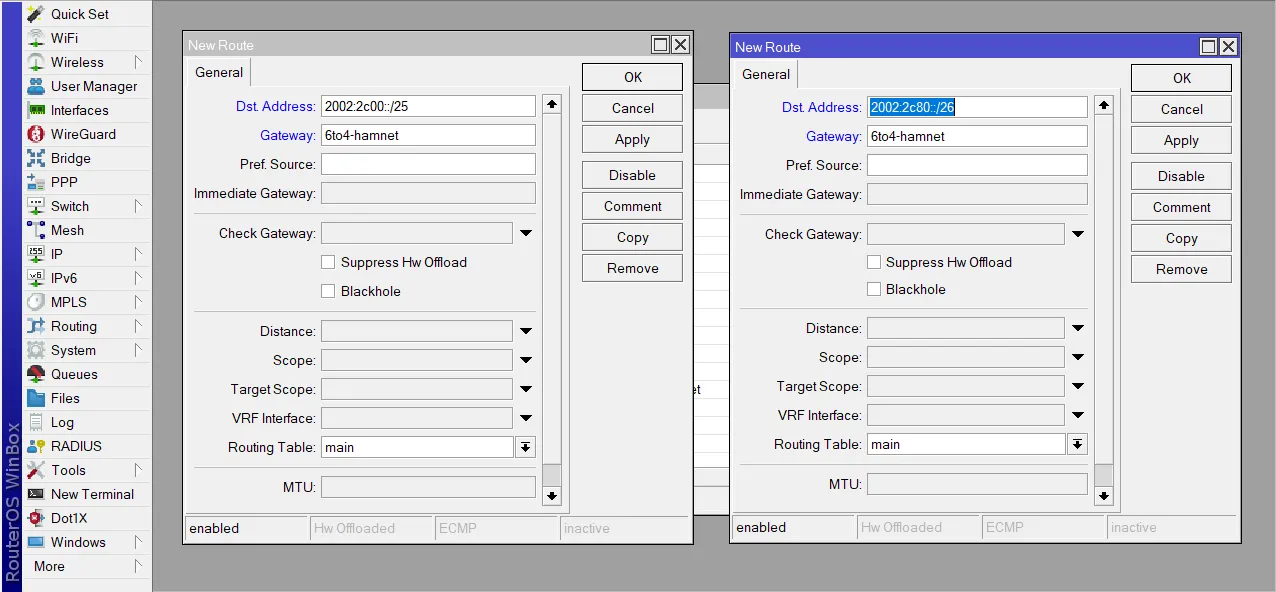
IPv6 > Routesand add two routes.Destination Addressshould be2002:2c00::/25for the first route, and2002:2c80::/26for the second one. In both routesGatewayshould be the name of your 6to4 interface.
At this point, devices connected to the interface you added the IPv6 address to (ether1 for me)
should get themselves v6 addresses automatically, but you can also configure them manually:
        Address: 2002:2c80:8001::2
  Prefix length: 64
Default gateway: 2002:2c80:8001::1
            DNS: 2002:2c94:d2ff::abc
Available services
I run a recursive DNS resolver available on 6to4 hamnet. Its address is 2002:2c94:d2ff::abc.
You can try pinging it to see if your setup is working.
Additionally, I run a test-ipv6.com mirror so you can test your connection by going there.
This website is also accessible over 6to4 hamnet at http://[2002:2c94:d2ff:3::6259:35e3]
To my delight, OE1RCI picked up the idea and made all of his services accessible over 6to4, as well! These include:
- His website
- Speed test
- TLEs
- Gopherhole - Read more
- Torrent tracker - Read more
- Drawpile instance - Read more
- Minecraft server (1.7.10) - Read more
Normally, he uses two domains: oe1rci.hamip.at and oe1rci.hamnet.radio, however, he doesn’t control these,
and therefore, has no way of adding AAAA records to them, so I set up rci.radioz.org which resolves to both IPv4 and IPv6.
If you decide to make a service of your own available using this method, send me an e-mail. I’ll happily list it here.
Systemd-Networkd
In a previous post I mentioned that my router is a pure Linux machine rather than a MikroTik so here is the config for that:
sudo nano /etc/systemd/network/60-6to4-hamnet.netdev

[NetDev]
Name=sit-hamnet
Kind=sit
Description=6to4 tunneling on HAMNET

[Tunnel]
Local=44.148.211.136
Remote=0.0.0.0
TTL=255
sudo nano /etc/systemd/network/60-6to4-hamnet.network
[Match]
Name=sit-hamnet
[Network]
Address=2002:2c94:d388::/48
[Route]
Destination=2002:2c00::/25
[Route]
Destination=2002:2c80::/26Parent interface:
[Match]
Name=wg-hamnet

[Network]
Address=44.148.211.136/32
Tunnel=sit-hamnet # Important - defines that 6to4 is the parent interface of the tunnel

[Route]
Destination=44.0.0.0/9

[Route]
Destination=44.128.0.0/10
Article Changelog
May 17, 2026
- Mention OE1RCI who picked up the idea (I should have done this much earlier)
May 4, 2026
- Add a note about needing to install IPv6 package on RouterOS 6
April 26, 2026
- Clarify the existing explanation of pros and cons of 6to4
- Address what happens when HAMNET gets native IPv6
- Add information about my test-ipv6.com mirror
April 25, 2026
- Update step 4 to include a 6to4 route for
44.0.0.0/9, not just 44.128.0.0/10, since I noticed some space outside of44.128.0.0/10being used on HAMNET. - Updated DNS and Web server addresses to match my new setup
- Fix the prefix calculator bug that leaves out zeros in a prefix whose 2nd or 4th IPv4 segment is less than 16.
- Previous, bad:
44.128.128.1 -> 2002:2c80:801::/48 - Current, good:
44.128.128.1 -> 2002:2c80:8001::/48
- Previous, bad:
- Update picture in step 3 to reflect fixed prefix calculation
- Slightly alter the introduction text about how we have to show willingness to implement IPv6